FSA ID: Creating and Using Your FSA ID Overview
What is the FSA ID?
The FSA ID is a username and password used by students, parents, and borrowers to:
• Login to some U.S. Department of Education websites and
• Electronically sign documents.
You use it to:
• Apply for federal student aid at fafsa.gov;
• Receive a federal student loan; and
• Perform important activities such as choosing a repayment plan or applying for a deferment on your federal student loan.
Do parents need FSA IDs?
If you’re a dependent student, then your parent will need an FSA ID in order to sign your Free Application for Federal Student Aid (FAFSA®) form electronically.
Not sure if you’re considered a dependent student for FAFSA purposes? Go to StudentAid.gov/dependency to find out.
IMPORTANT
You and your parent must have different FSA IDs.
You must create your own FSA ID—it’s your electronic signature and you need to own it.
Your parent must create his or her own FSA ID.
You and your parent should each use your own email address and mobile phone number when creating an FSA ID (you can’t use/share the same email address and mobile phone number).
How do you create your FSA ID?
Go to StudentAid.gov/fsaid.
Click the “Create Your FSA ID Now” button.

Create Your FSA ID (Username and Password)
Email: Optional but strongly recommended
Each FSA ID must have a unique email address (you and your parent cannot use the same email address).
You must have access to this email account.
Username: Don’t include personal info such as date of birth or name.
If you see a message “Username taken, create a different username,” then someone has already used that username.

Provide Personal Identification Information
Make sure your Social Security number, date of birth, and name match what’s on your Social Security card.
You must have a Social Security number to create an FSA ID.

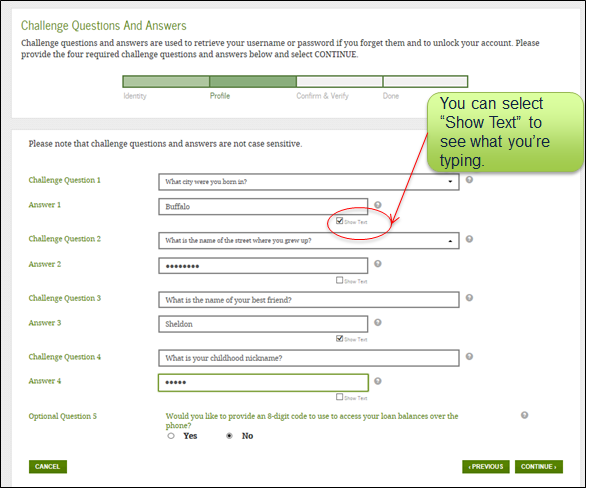
Select/Create Challenge Questions and Answers
Answering your challenge questions is one way to unlock your account or reset your username and password.
Questions 1 and 2:
Select a question from the drop-down menu and then enter your answer.
Questions 3 and 4:
Make up your own question and enter your answer.
Make sure the answers will be easy to remember.
Examples of questions:
What city was I born in?
Who was my first boss?
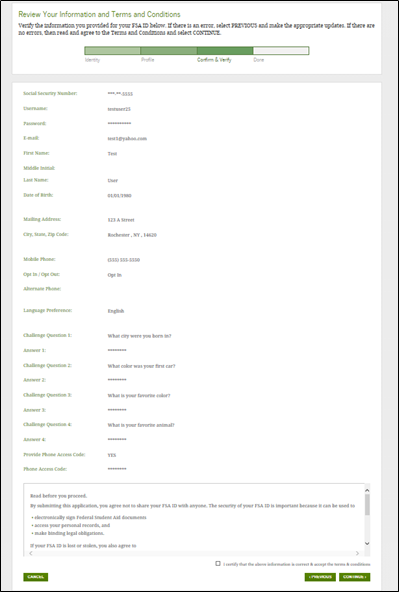
Review Info and Agree to Terms
Review and confirm your information.
If you need to make a correction, use the “Previous” button.
Review and agree to the terms and conditions for using your FSA ID.
Verify Your Mobile Phone Number
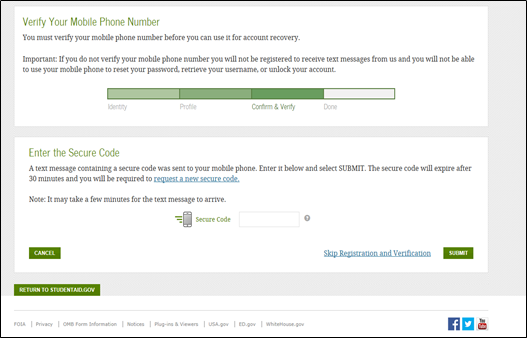
If you provided a mobile phone number, then you’ll be taken to the Mobile Phone Number Verification page.
Once you verify your mobile phone number, you can use your mobile phone to unlock your account, retrieve your username, or reset your password.
You can also continue without verifying.
How to Verify Your Mobile Phone Number
Do not close the Mobile Phone Number Verification page.
You’ll receive a text message with a secure code.
The text message will include a six-digit numeric code that you will enter in the “Secure Code” data field.
Mobile Phone Number Verification Page

Verify Your Email
If you provided an email address, then you’ll be taken to the Email Verification page.
Once you verify your email, you can use your email address as your username when logging in to Department of Education websites.
How to Verify Your Email
Do not close the Email Verification page.
You’ll receive an email with a secure code.
Log in to your email account using a different tab or browser window or another device.
Look for an email with the subject line, “Important: Your FSA ID E-mail Validation – Action Required.”
The email will include a six-digit numeric code that you will enter in the “Secure Code” data field.

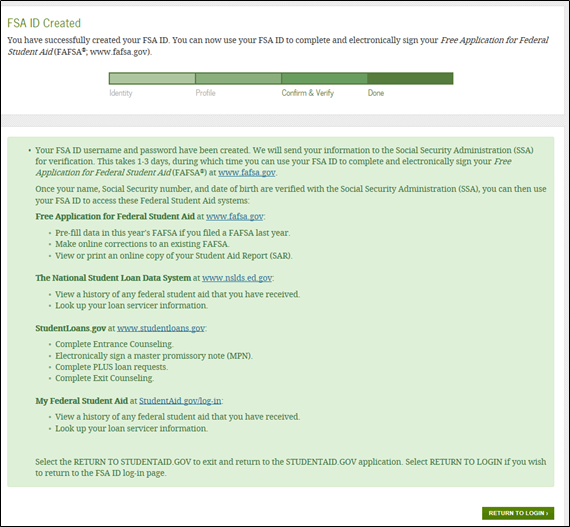
Your FSA ID is created!
Your FSA ID was created.
If you provided an email address, then you’ll receive a confirmation email.
Using Your FSA ID
You can log in to fafsa.gov and complete, sign, and submit a new (original) FAFSA® form.
Your info will be sent to the Social Security Administration (SSA) for confirmation.
SSA review will take 1–3 days.
Until your info is verified, you won’t be able to take certain actions, such as correcting your FAFSA form, submitting a renewal FAFSA form, or signing a Master Promissory Note.
FSA ID Tips
One of your parents might need an FSA ID as well. If you need to provide information about your parents on the FAFSA® form, one of your parents will have to sign the form. Your parent can create an FSA ID and then sign the FAFSA form electronically using that FSA ID. Not sure whether you’ll need to put your parents’ information on the FAFSA form? Check out StudentAid.gov/dependency. Remember: You should create your own FSA ID and your parent should create his or her own FSA ID. Also, make sure to use the correct FSA ID when signing the FAFSA form electronically.
When you first create your FSA ID, all you’ll be able to use your FSA ID for is to complete, sign, and submit an original (first-time) FAFSA form. You’ll have to wait one to three days for your information to be confirmed by the Social Security Administration (SSA) before you can use your FSA ID for other actions, such as submitting a Renewal FAFSA form or signing a Master Promissory Note. If you provided an email address, then you’ll receive an email letting you know that your information was successfully matched with the SSA and you can use your FSA ID for all of its purposes.
If you forget your FSA ID username and password, look for links, such as “Forgot My Username” and “Forgot My Password,” at the log-in pages of our websites. These links will direct you to web pages where you can request a secure code to be texted to your verified mobile phone number or emailed to your verified email address. The secure code will allow you to retrieve your username or reset your password. You can also retrieve your username or reset your password by successfully answering your challenge questions.
What’s an FSA ID? The FSA ID is a username and password you use to log in to certain U.S. Department of Education websites, including fafsa.gov, StudentAid.gov, and StudentLoans.gov. The FSA ID is your legal signature and shouldn’t be created or used by anyone other than you—not even your parent, your child, a school official, or a loan company representative. You’ll use your FSA ID every year you fill out a Free Application for Federal Student Aid (FAFSA® ) form and for the lifetime of your federal student loans. How do I get an FSA ID? Visit StudentAid.gov/fsaid to create an FSA ID. You’ll need your Social Security number, full name, and date of birth. You’ll also need to create a memorable username and password, and provide answers to some challenge questions so you can retrieve your account information if you forget it. We strongly recommend that you provide a mobile phone number and email address when you make your FSA ID. Providing a mobile phone number and/or email address that you have access to will make it easier to unlock your account, retrieve your forgotten username, or reset your forgotten password. Important: An email address and mobile phone number cannot be used with more than one FSA ID. If you share an email address with someone else, then only one of you will be able to use that email address to create an FSA ID. This applies to your mobile phone number too.

 Robb the REALTOR